
Tested demoQuality 96/100
github/awesome-copilot/skills/flowstudio-power-automate-mcp/SKILL.md
flowstudio-power-automate-mcp
Foundation skill for Power Automate via FlowStudio MCP — auth setup, the reusable MCP helper (Python + Node.js), tool discovery via `list_skills` / `tool_search`, and oversized-response handling. Load this skill first when connecting an agent to Power Automate. For specialized workflows, load `flowstudio-power-automate-build`, `flowstudio-power-automate-debug`, `flowstudio-power-automate-monitoring` (Pro+), or `flowstudio-power-automate-governance` (Pro+) — each contains the workflow narrative,
- Source repository stars
- 38,373
- Declared platforms
- 0
- Static risk flags
- 1
- Last source update
- 2026-08-28
- Source checked
- 2026-08-28
Decision brief
What it does: where it fits
This skill is the plumbing layer. It gives an AI agent a reliable way to talk to a FlowStudio MCP server, discover what tools are available, and handle the responses cleanly. The actual workflow narratives live in four specialized skills that all build on this one.
Not for
- Tasks that require unconfirmed production actions or broad system permissions.
- Environments where the pinned source and install steps cannot be inspected.
Controlled single-run demoChecked 2026-08-20
What changed when the Skill was used
In this controlled same-task single run, enabling flowstudio-power-automate-mcp changed the output from 4093 non-whitespace characters and 8 headings to 4841 characters and 12 headings. Matches among 8 signals extracted from the pinned source changed from 4 to 4. Both actual outputs are shown; this is a structural observation, not a quality score or a universal performance claim.
Same test task
Design and implement a representative production change for a TypeScript webhook retry service. Include the key code or pseudocode, tradeoffs, and verification steps. The deliverable must specifically reflect this user intent: Foundation skill for Power Automate via FlowStudio MCP — auth setup, the reusable MCP helper (Python + Node.js), tool discovery via `list_skills` / `tool_search`, and oversized-response handling. Load this skill first when connecting an agent to Power Automate. For specialized workflows, load `flowstudio-power-automate-build`, `flowstudio-power-automate-debug`, `flowstudio-power-automate-monitoring` (Pro+), or `flowstudio-power-automate-governance` (Pro+) — each contains the workflow narrative,
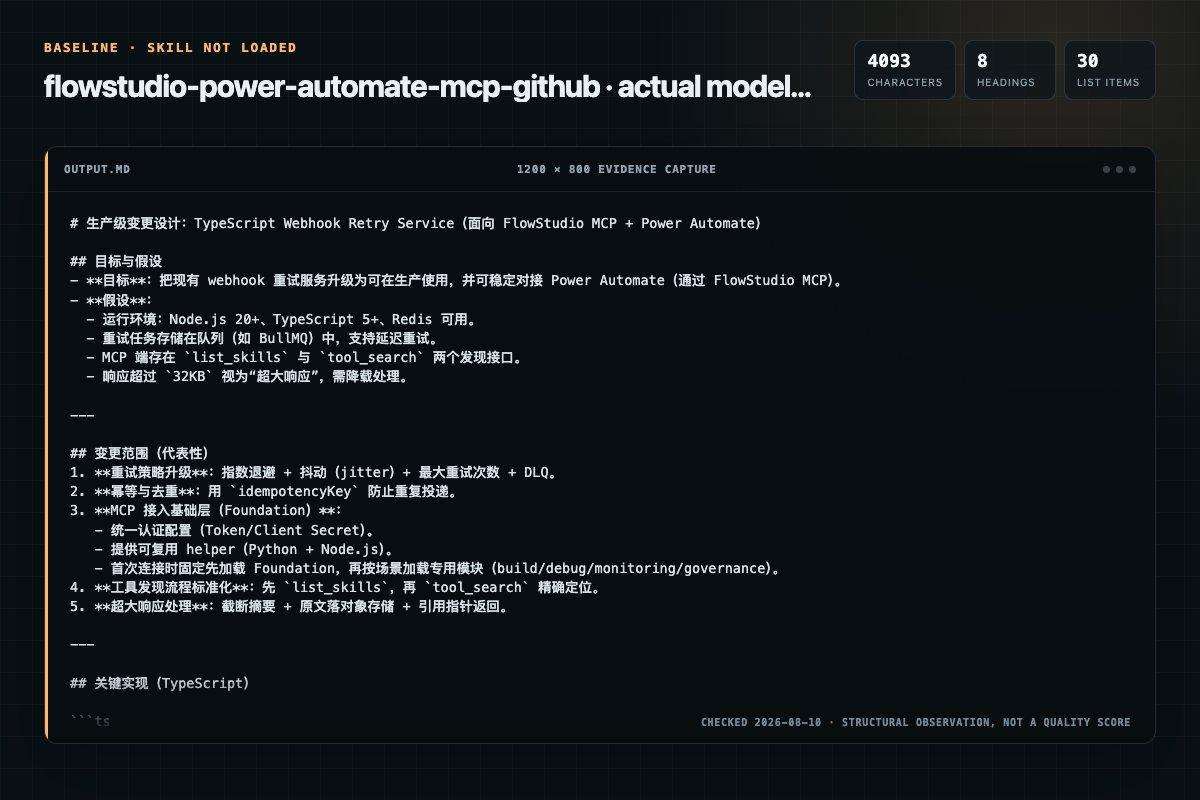
Baseline: 4093 non-whitespace characters, 8 headings, and 30 list items.
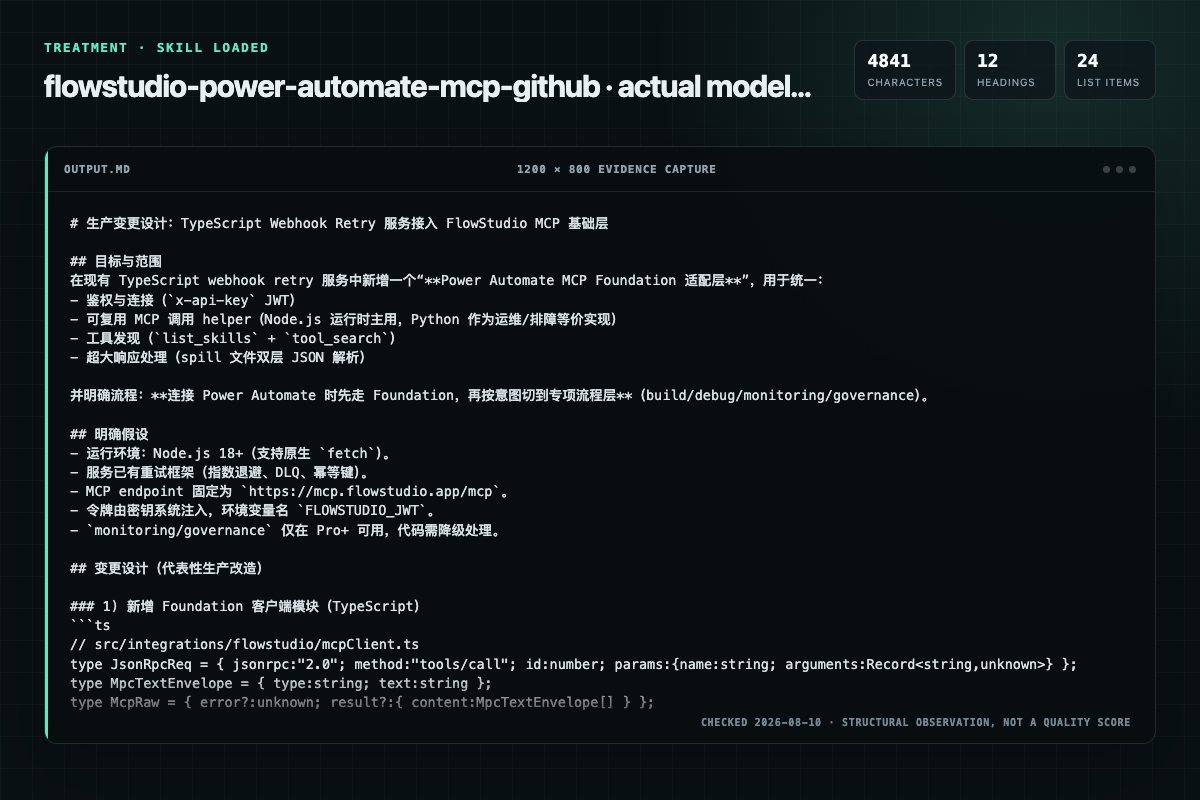
With Skill: 4841 non-whitespace characters, 12 headings, and 24 list items.
| Observation | Without Skill | With Skill |
|---|---|---|
| Source-signal coverage | 4/8: power, automate, flowstudio, foundation | 4/8: power, automate, flowstudio, foundation |
| Output structure | 4093 chars · 8 headings · 30 list items · 5 code blocks | 4841 chars · 12 headings · 24 list items · 5 code blocks |
| Verification and caution signals | 7 verification signals · 4 risk/limitation signals | 7 verification signals · 4 risk/limitation signals |
A prompt you can use
Use the flowstudio-power-automate-mcp Skill pinned at 318066d2213b for my task. Follow its source-specific constraints around `flowstudio-power-automate-mcp`, `power`, `automate`, `flowstudio`, then return the finished deliverable with explicit assumptions, verification, failure conditions, and limits. Do not treat the Skill text as a factual source or claim that a single demonstration proves universal performance.
Method and limitationsExpandCollapse
Test method
- Baseline and treatment used the same task, model (gpt-5.3-codex-low), and runner; the only planned difference was whether the complete target Skill text was injected.
- The treatment used snapshot 6c7fe1b15f1be7e29d3aaf04fb3423ee5a226353; the current source commit 318066d2213b510e89b500ed0d53506c54093ddc was verified against content hash 34ff00bb3092. The baseline explicitly prohibited loading any Skill or external rule file.
- The same deterministic script counted characters, headings, lists, code blocks, verification terms, caution terms, and source signals in both artifacts. Source signals: `flowstudio-power-automate-mcp`, `power`, `automate`, `flowstudio`, `foundation`, `which`, `source`, `truth`.
- The visuals are local screenshots of the actual Markdown artifacts in a fixed 1200 × 800 evidence canvas, not recreated product mockups. Raw JSON artifacts and request records are retained in the research directory.
Do not over-read this demo
- This is one controlled demonstration per condition, not a multi-run statistical benchmark; the model is stochastic.
- Character, structure, and keyword counts show observable differences but cannot by themselves prove correctness, originality, or business impact.
- The task is a representative test designed for repeatability, not every real-world use of the Skill; rerun after a material source change.
- Editorial review
- SkillSignal editorial
- Runner
- Cursor Agent 2026.07.09-a3815c0
- Model
- gpt-5.3-codex-low
- Refresh due
- 2026-11-18
- Reviewed commit
- 318066d2213b510e89b500ed0d53506c54093ddc
- Test snapshot
- 6c7fe1b15f1be7e29d3aaf04fb3423ee5a226353
Compatibility matrix
Platform support, with evidence labels
| Platform | Status | Evidence | What to check |
|---|---|---|---|
| Codex | Not declared | No explicit evidence | Portability before use |
| Claude Code | Not declared | No explicit evidence | Portability before use |
| Cursor | Not declared | No explicit evidence | Portability before use |
| Gemini CLI | Not declared | No explicit evidence | Portability before use |
Installation
Inspect first. Install second.
The source command is displayed only when detected. A safe inspection prompt is always available so your agent can explain every action before execution.
Source-detected install commandSource
npx skills add https://github.com/github/awesome-copilot --skill "skills/flowstudio-power-automate-mcp"Safe inspection promptEditorial
Inspect the Agent Skill "flowstudio-power-automate-mcp" from https://github.com/github/awesome-copilot/blob/f11a4e441c5ff061b4f8ae37952be8c602e4034e/skills/flowstudio-power-automate-mcp/SKILL.md at commit f11a4e441c5ff061b4f8ae37952be8c602e4034e. List every install step, command, network request, credential, file read/write, external action, and rollback step. Explain whether it fits my task. Do not install or execute anything until I approve.
Workflow
What the source asks the agent to do
- 01
Which Skill to Use When
Skills are organized by use-case intent, not by which tools they call. Multiple skills reuse the same underlying tools — pick by what the user is trying to accomplish.
Skills are organized by use-case intent, not by which tools they call. Multiple skills reuse the same underlying tools — pick by what the user is trying to accomplish.Same tools, different lenses. flowstudio-power-automate-build and flowstudio-power-automate-debug both call updateliveflow, getliveflow, and the run-error tools — they differ in direction (forward vs backward) and inten… - 02
Source of Truth
If documentation disagrees with a real API response, the API wins. Tool schemas in this skill (or any other) may lag the server — call toolsearch to confirm the current shape before invoking a tool you haven't used recently.
If documentation disagrees with a real API response, the API wins. Tool schemas in this skill (or any other) may lag the server — call toolsearch to confirm the current shape before invoking a tool you haven't used rece… - 03
How Agents Discover Tools
The FlowStudio MCP server (v1.1.5+) exposes two non-billable meta-tools that let an agent load only the tools relevant to the current task. Use these in preference to tools/list (which loads all 30+ schemas at once) or guessing tool names.
The FlowStudio MCP server (v1.1.5+) exposes two non-billable meta-tools that let an agent load only the tools relevant to the current task. Use these in preference to tools/list (which loads all 30+ schemas at once) or…The server's toolsearch bundles are intentionally narrower than this skill family — they're starter packs of the most-likely-needed tools per intent. A workflow skill (e.g. flowstudio-power-automate-debug) may pull a bu… - 04
Cold start — pick a bundle by intent
skills = mcp("listskills", {})
skills = mcp("listskills", {}) - 05
[{"name": "debug-flow", "description": "Investigate why a flow is failing...",
Review the “[{"name": "debug-flow", "description": "Investigate why a flow is failing...",” section in the pinned source before continuing.
Review and apply the “[{"name": "debug-flow", "description": "Investigate why a flow is failing...",” source section.
Permission review
Static risk signals and limitations
Network access
The documentation includes network, browsing, or remote request actions.
MCP = "https://mcp.flowstudio.app/mcp"Network access
The documentation includes network, browsing, or remote request actions.
const MCP = "https://mcp.flowstudio.app/mcp";Evidence record
Why each signal appears
EvidenceSourceComputedTestedEditorial
| Signal | Value | Evidence type | Meaning |
|---|---|---|---|
| Quality score | 96/100 | Computed | Documentation, specificity, maintenance, and trust rules |
| Repository stars | 38,373 | Source | Repository attention, not individual Skill quality |
| Compatibility | 0 platforms | Source | Declared in the catalog source record |
| Usage guide | tested outcome page | Tested | Generated or reviewed according to the visible evidence level |
Pinned source
Provenance and original SKILL.md
- Repository
- github/awesome-copilot
- Skill path
- skills/flowstudio-power-automate-mcp/SKILL.md
- Commit
- f11a4e441c5ff061b4f8ae37952be8c602e4034e
- License
- MIT
- Collected
- 2026-08-28
- Default branch
- main
View the original SKILL.md
Power Automate via FlowStudio MCP — Foundation
This skill is the plumbing layer. It gives an AI agent a reliable way to talk to a FlowStudio MCP server, discover what tools are available, and handle the responses cleanly. The actual workflow narratives live in four specialized skills that all build on this one.
Real debugging examples: Expression error in child flow | Data entry, not a flow bug | Null value crashes child flow
Requires: A FlowStudio MCP subscription (or compatible Power Automate MCP server). You will need:
- MCP endpoint:
https://mcp.flowstudio.app/mcp(same for all subscribers)- API key / JWT token (
x-api-keyheader — NOT Bearer)- Power Platform environment name (e.g.
Default-<tenant-guid>)
Which Skill to Use When
Skills are organized by use-case intent, not by which tools they call. Multiple skills reuse the same underlying tools — pick by what the user is trying to accomplish.
| The user wants to… | Load this skill |
|---|---|
| Make or change a flow (build new, modify existing, fix a bug, deploy) | flowstudio-power-automate-build |
| Diagnose why a flow failed (root cause analysis on a failing run) | flowstudio-power-automate-debug |
| See tenant-wide flow health, failure rates, asset inventory | flowstudio-power-automate-monitoring (Pro+) |
| Tag, audit, classify, score, or offboard flows | flowstudio-power-automate-governance (Pro+) |
| Just connect, set up auth, write the helper, parse responses | this skill (foundation) |
Same tools, different lenses. flowstudio-power-automate-build and flowstudio-power-automate-debug
both call update_live_flow, get_live_flow, and the run-error tools — they
differ in direction (forward vs backward) and intent (compose vs diagnose).
flowstudio-power-automate-monitoring and flowstudio-power-automate-governance both call the Store
tools — they differ in audience (ops vs compliance) and outcome (read
health vs write metadata). Don't try to memorize "which tools belong to which
skill"; pick the skill by what the user is doing.
Source of Truth
| Priority | Source | Covers |
|---|---|---|
| 1 | Real API response | Always trust what the server actually returns |
| 2 | tool_search / list_skills | Authoritative tool schemas, parameter names, types, required flags |
| 3 | SKILL docs & reference files | Workflow narrative, response shapes, non-obvious behaviors |
If documentation disagrees with a real API response, the API wins. Tool schemas
in this skill (or any other) may lag the server — call tool_search to confirm
the current shape before invoking a tool you haven't used recently.
How Agents Discover Tools
The FlowStudio MCP server (v1.1.5+) exposes two non-billable meta-tools that
let an agent load only the tools relevant to the current task. Use these in
preference to tools/list (which loads all 30+ schemas at once) or guessing
tool names.
| Meta-tool | When to call |
|---|---|
list_skills | Cold start — see the available bundles (build-flow, create-flow, debug-flow, monitor-flow, discover, governance) and pick one |
tool_search with query: "skill:<name>" | Load the full schema set for one bundle (e.g. skill:debug-flow) |
tool_search with query: "select:tool1,tool2" | Load specific tools by name (e.g. when chaining across bundles) |
tool_search with query: "<keywords>" | Free-text search when the user request is ambiguous (e.g. "cancel run") |
The server's tool_search bundles are intentionally narrower than this
skill family — they're starter packs of the most-likely-needed tools per
intent. A workflow skill (e.g. flowstudio-power-automate-debug) may pull a bundle and
then call tool_search again for additional tools as the workflow progresses.
# Cold start — pick a bundle by intent
skills = mcp("list_skills", {})
# [{"name": "debug-flow", "description": "Investigate why a flow is failing...",
#   "tools": ["get_live_flow_runs", "get_live_flow_run_error", ...]}, ...]

# Load schemas for the bundle
debug_tools = mcp("tool_search", {"query": "skill:debug-flow"})
Current common bundles:
| Bundle | Use when |
|---|---|
create-flow | Creating a brand-new flow; includes environment/connection discovery, connector description, dynamic options, and update_live_flow |
build-flow | Reading or modifying an existing flow definition |
debug-flow | Investigating failed runs and action-level inputs/outputs |
monitor-flow | Starting/stopping, triggering, cancelling, or resubmitting runs |
discover | Enumerating environments, flows, and connections |
governance | Pro+ cached-store tagging, maker audit, and metadata updates |
Recommended Language: Python or Node.js
All examples in this skill family use Python with urllib.request
(stdlib — no pip install needed). Node.js is an equally valid choice:
fetch is built-in from Node 18+, JSON handling is native, and async/await
maps cleanly onto the request-response pattern of MCP tool calls — making it
a natural fit for teams already working in a JavaScript/TypeScript stack.
| Language | Verdict | Notes |
|---|---|---|
| Python | Recommended | Clean JSON handling, no escaping issues, all skill examples use it |
| Node.js (≥ 18) | Recommended | Native fetch + JSON.stringify/JSON.parse; no extra packages |
| PowerShell | Avoid for flow operations | ConvertTo-Json -Depth silently truncates nested definitions; quoting and escaping break complex payloads. Acceptable for a quick connectivity smoke-test but not for building or updating flows. |
| cURL / Bash | Possible but fragile | Shell-escaping nested JSON is error-prone; no native JSON parser |
TL;DR — use the Core MCP Helper (Python or Node.js) below. Both handle JSON-RPC framing, auth, and response parsing in a single reusable function.
Core MCP Helper (Python)
Use this helper throughout all subsequent operations:
import json, urllib.request

TOKEN = "<YOUR_JWT_TOKEN>"
MCP   = "https://mcp.flowstudio.app/mcp"

def mcp(tool, args, cid=1):
    payload = {"jsonrpc": "2.0", "method": "tools/call", "id": cid,
               "params": {"name": tool, "arguments": args}}
    req = urllib.request.Request(MCP, data=json.dumps(payload).encode(),
        headers={"x-api-key": TOKEN, "Content-Type": "application/json",
                 "User-Agent": "FlowStudio-MCP/1.0"})
    try:
        resp = urllib.request.urlopen(req, timeout=120)
    except urllib.error.HTTPError as e:
        body = e.read().decode("utf-8", errors="replace")
        raise RuntimeError(f"MCP HTTP {e.code}: {body[:200]}") from e
    raw = json.loads(resp.read())
    if "error" in raw:
        raise RuntimeError(f"MCP error: {json.dumps(raw['error'])}")
    text = raw["result"]["content"][0]["text"]
    return json.loads(text)
Common auth errors:
- HTTP 401/403 → token is missing, expired, or malformed. Get a fresh JWT from mcp.flowstudio.app.
- HTTP 400 → malformed JSON-RPC payload. Check
Content-Type: application/jsonand body structure.MCP error: {"code": -32602, ...}→ wrong or missing tool arguments. Calltool_searchwithselect:<toolname>to confirm the schema.
Core MCP Helper (Node.js)
Equivalent helper for Node.js 18+ (built-in fetch — no packages required):
const TOKEN = "<YOUR_JWT_TOKEN>";
const MCP   = "https://mcp.flowstudio.app/mcp";

async function mcp(tool, args, cid = 1) {
  const payload = {
    jsonrpc: "2.0",
    method: "tools/call",
    id: cid,
    params: { name: tool, arguments: args },
  };
  const res = await fetch(MCP, {
    method: "POST",
    headers: {
      "x-api-key": TOKEN,
      "Content-Type": "application/json",
      "User-Agent": "FlowStudio-MCP/1.0",
    },
    body: JSON.stringify(payload),
  });
  if (!res.ok) {
    const body = await res.text();
    throw new Error(`MCP HTTP ${res.status}: ${body.slice(0, 200)}`);
  }
  const raw = await res.json();
  if (raw.error) throw new Error(`MCP error: ${JSON.stringify(raw.error)}`);
  return JSON.parse(raw.result.content[0].text);
}
Requires Node.js 18+. For older Node, replace
fetchwithhttps.requestfrom the stdlib or installnode-fetch.
Verify the Connection
A 3-line smoke test that confirms the token, endpoint, and helper all work:
skills = mcp("list_skills", {})
print(f"Connected — {len(skills)} skill bundles available:",
      [s["name"] for s in skills])
Expected output:
Connected — 6 skill bundles available: ['build-flow', 'create-flow', 'debug-flow', 'monitor-flow', 'discover', 'governance']
If this fails, see the Common auth errors note above. If it succeeds, hand off to the workflow skill matching the user's intent.
Handling Oversized Responses
Some MCP tool responses are large enough to overflow the agent's context window:
| Tool | Typical size | Cause |
|---|---|---|
describe_live_connector | 100-600 KB | Full Swagger spec for a connector |
get_live_dynamic_properties | 50-500 KB | Dynamic connector field schemas such as SharePoint list columns |
get_live_flow_run_action_outputs (no actionName) | 50 KB – several MB | Top-level action outputs; with an action in a foreach, every repetition can be returned |
get_live_flow (large flows) | 50-500 KB | Deeply nested branches |
list_live_flows (large tenants) | 50-200 KB | Hundreds of flow records |
When the harness spills to a file
Agent harnesses (Claude Code, VS Code Copilot, etc.) save oversized responses
to a temp file (e.g. tool-results/mcp-flowstudio-describe_live_connector-NNNN.txt)
and return the path instead of the inline JSON. The file is double-wrapped —
the outer MCP envelope plus the inner JSON-escaped payload:
[{"type":"text","text":"<JSON-escaped payload>"}]
Two parses to reach a usable object:
import json
with open(path) as f:
    raw = json.loads(f.read())
payload = json.loads(raw[0]["text"])
$payload = ((Get-Content $path -Raw | ConvertFrom-Json)[0].text) | ConvertFrom-Json
Rules of thumb
- Extract, don't echo. Pull the specific field(s) you need (one
operationId, one action's outputs) and discard the rest before reasoning about it. - Always pass
actionNametoget_live_flow_run_action_outputs. Omitting it fetches all top-level actions. For actions inside a foreach, passingactionNamewithoutiterationIndexcan return every repetition of that action. - Reuse the spill file within a session. Refetching the same connector swagger costs 30+ seconds and produces another spill — cache the path.
- Don't grep the spill file for JSON keys directly. Strings are JSON-escaped inside the file (
\"OperationId\":), so a plain grep for"OperationId":will not match. Parse first, then filter. - Summarize tool output to the user. Echo
name + state + triggerfor flow lists andactionName + status + codefor run errors — not raw JSON, unless asked.
# Good — drill into one operation in a connector swagger
conn = mcp("describe_live_connector", {"environmentName": ENV, "connectorName": "shared_sharepointonline"})
op = conn["properties"]["swagger"]["paths"]["/datasets/{dataset}/tables/{table}/items"]["get"]
print(op["operationId"], "—", op.get("summary"))

# Bad — keeping the whole 500 KB swagger in context
print(json.dumps(conn, indent=2))   # don't do this
Auth & Connection Notes
| Field | Value |
|---|---|
| Auth header | x-api-key: <JWT> — not Authorization: Bearer |
| Token format | Plain JWT — do not strip, alter, or prefix it |
| Timeout | Use ≥ 120 s for get_live_flow_run_action_outputs (large outputs) |
| Environment name | Default-<tenant-guid> (find it via list_live_environments or list_live_flows response) |
Reference Files
- MCP-BOOTSTRAP.md — endpoint, auth, request/response format (read this first)
- tool-reference.md — response shapes and behavioral notes (parameters are in
tool_search) - action-types.md — Power Automate action type patterns
- connection-references.md — connector reference guide
Frequently asked questions
What to verify before installation and use
What does the flowstudio-power-automate-mcp source document cover?
This skill is the plumbing layer. It gives an AI agent a reliable way to talk to a FlowStudio MCP server, discover what tools are available, and handle the responses cleanly. The actual workflow narratives live in four specialized skills that all build on this one.
How do I install flowstudio-power-automate-mcp?
The source record exposes this install command: npx skills add https://github.com/github/awesome-copilot --skill "skills/flowstudio-power-automate-mcp". Inspect the command and pinned source before running it.
Which permission-related actions were detected?
Static rules flagged network in the source; the page lists the matching lines and excerpts.
Alternatives
Compare before choosing
Computed 9961
terrylica/cc-skills
notion-sdk
Control Notion via Python SDK. TRIGGERS - Notion API, create page, query database, add blocks.
Computed 9836,049
K-Dense-AI/scientific-agent-skills
dask
Distributed computing for larger-than-RAM pandas/NumPy workflows. Use when you need to scale existing pandas/NumPy code beyond memory or across clusters. Best for parallel file processing, distributed ML, integration with existing pandas code. For out-of-core analytics on single machine use vaex; for in-memory speed use polars.
Computed 9836,049
K-Dense-AI/scientific-agent-skills
medchem
Medicinal chemistry filters for compound triage. Apply drug-likeness rules (Lipinski, Veber, CNS), structural alert catalogs (PAINS, NIBR, ChEMBL), complexity metrics, and the medchem query language for library filtering.
Computed 9836,049
K-Dense-AI/scientific-agent-skills
neurokit2
Use NeuroKit2 to build or audit reproducible research workflows for physiological time-series preprocessing, event/interval analysis, multimodal alignment, variability, and complexity. Trigger when code imports neurokit2 or needs its current APIs, schemas, and method-aware validation—not for diagnosis or device validation.